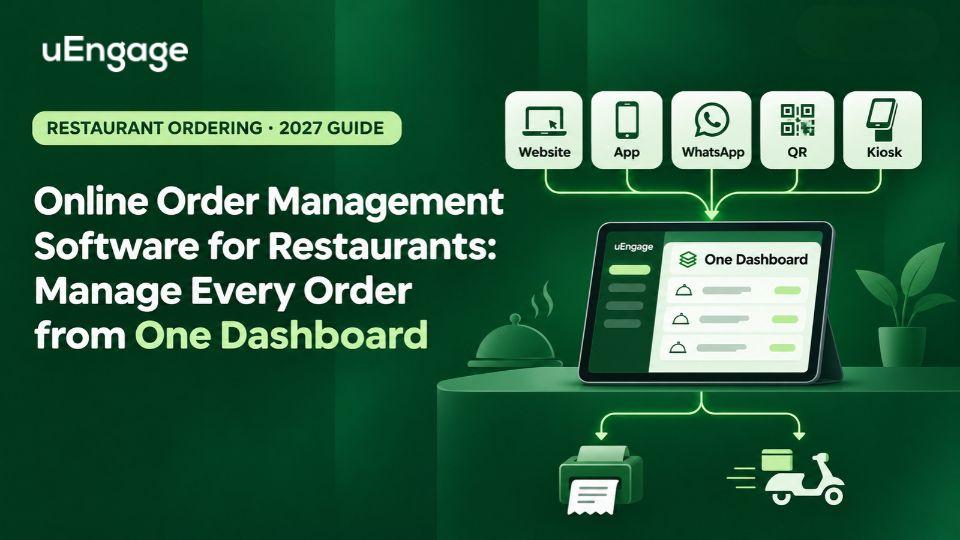
A restaurant can receive orders from its website, mobile app, WhatsApp, QR menu and self-ordering kiosk.
That sounds like growth.
But when every channel follows a different operational journey, more orders can also mean more screens, delayed acceptance, incorrect menu information and a confused kitchen team.
The problem is not necessarily the number of ordering channels. It is what happens after an order is placed.
An online order management system for restaurants brings incoming orders into one connected workflow, helping the team accept, process, fulfil and track them without moving between separate tools.
A new ordering channel should increase revenue, not add another operational problem for the restaurant team.
Quick answer: What is online order management software for restaurants?
Online order management software is a system that helps restaurants receive and process digital orders from different channels through one dashboard.
Depending on the platform, these channels may include:
Restaurant website
Branded mobile app
WhatsApp
QR code menu
Self-ordering kiosk
In-store digital ordering
Third-party ordering platforms
A connected system can pass order information to the restaurant’s POS or kitchen workflow, update the order status, collect payment information and support pickup or delivery fulfilment.
Its purpose is simple: every order should follow a consistent operational journey, regardless of where the customer placed it.
Why restaurants need more than an online ordering page
An ordering page helps the customer place an order. An order management system helps the restaurant fulfil it properly.
That distinction matters.
According to the National Restaurant Association’s 2025 State of the Restaurant Industry report, 51% of consumers consider takeout or delivery essential to their lifestyle. The report also found that 49% of restaurant operators planned to invest in contactless ordering or payment technology, while 40% planned to invest in smartphone-app development. National Restaurant Association
Restaurants are therefore adding more digital touchpoints. However, adding a website, app or kiosk does not automatically create a connected operation.
Without proper order management, the team may still need to:
Check separate screens for new orders
Enter information manually into the POS
Confirm item availability across channels
Call the customer about missing details
Coordinate separately with the delivery team
Update order status manually
Combine reports from different systems
The customer sees a convenient ordering interface. Behind the counter, the restaurant may still be running the process through calls, messages and manual entries.
Online ordering system vs order management system
The two terms are related, but they do not mean exactly the same thing.
Online ordering system | Order management system |
|---|---|
Helps customers browse a menu | Helps the restaurant receive and process orders |
Collects customer and address details | Organises orders by outlet, channel and status |
Supports cart and checkout | Connects the order with POS and kitchen workflows |
Accepts digital payments | Tracks the order from acceptance to fulfilment |
Focuses on the customer journey | Focuses on the restaurant’s operational journey |
A restaurant may use an online ordering system without having strong order management.
For example, a restaurant website may successfully accept an order, but the outlet team may still have to copy that order into another system. That manual step creates room for delays and mistakes.
The better setup connects both sides:
Customer orders digitally ? outlet receives the order ? POS and kitchen are updated ? payment is recorded ? pickup or delivery begins ? customer receives updates.
Where restaurant order management starts to break
Order problems rarely begin with one major failure. They usually come from several small gaps in the workflow.
Different menus across ordering channels
An item may be available on the restaurant website but unavailable at the outlet. A price may be updated in one place but left unchanged somewhere else.
The result is often a cancellation or a call asking the customer to choose another item.
For a single outlet, this is irritating. Across several outlets, it becomes a daily operational issue.
Orders reaching the kitchen late
If an employee must notice an order, enter it into the POS and then inform the kitchen, every additional step adds time.
During peak hours, even a short delay in order acceptance can affect preparation and the promised delivery time.
Staff switching between multiple screens
Every screen requires attention. Every manual login creates another place where an order can be missed.
A centralized restaurant order dashboard gives the team one operational view instead of asking staff to monitor every ordering channel separately.
Delivery beginning too late
A customer may think the restaurant is taking too long to deliver the order. In reality, the delay may have started before a rider was assigned.
If order preparation and delivery allocation operate separately, the packed order may remain at the outlet while the team searches for a rider.
Customer data remaining disconnected
A direct order should tell the restaurant more than what the customer purchased.
It can also help the brand understand:
Whether the customer is new or returning
Preferred outlet
Order frequency
Average order value
Favourite items
Response to offers
Loyalty activity
Previous feedback
If this information stays locked inside separate ordering channels, the restaurant cannot use it to improve retention.
How a centralised restaurant order management system works
A connected order journey usually includes six stages.
1. The customer selects an ordering channel
Customers may order from the restaurant’s website, mobile app, WhatsApp, QR menu or kiosk.
The restaurant does not have to force every customer into the same channel. It must ensure that every channel connects to the same operational system.
2. The order reaches the correct outlet
The platform identifies the relevant outlet based on factors such as location, serviceability, selected store or delivery address.
For a multi-outlet restaurant, this is critical. Orders must reach the correct team without relying on manual forwarding.
3. The order enters the POS or order dashboard
The outlet can view key details, including:
Order number
Customer information
Items and customisations
Payment status
Pickup or delivery selection
Delivery address
Customer instructions
Expected preparation time
A POS-integrated workflow reduces the need to re-enter these details.
4. The kitchen begins preparation
Once accepted, the order can move into the restaurant’s kitchen workflow.
Clear item details and customisations help prevent the kitchen from preparing the wrong order. Status visibility also helps the counter and delivery teams understand when the order may be ready.
5. Pickup or delivery is coordinated
For pickup orders, the customer can receive a ready-for-collection update.
For delivery orders, the restaurant may use its own rider fleet, a third-party delivery partner or a combination of both. A connected workflow helps the team move from preparation to dispatch with less manual coordination.
6. Order data supports the next interaction
The order should not disappear after delivery.
With the right customer-data and marketing setup, the restaurant can use the order history to support:
Loyalty points
Feedback requests
Reorder reminders
Customer segmentation
Personalised campaigns
Win-back communication
This is where order management becomes more than an operational tool. It becomes part of the restaurant’s retention system.
Essential features to look for
Not every restaurant needs the same configuration. However, a reliable restaurant order management system should cover the following areas.
Multi-channel order capture
The software should support the ordering channels relevant to the business, such as:
Branded website
Android and iOS app
WhatsApp ordering
QR ordering
Self-ordering kiosk
More channels are useful only when they connect to a common workflow.
Centralized order dashboard
The team should be able to view incoming, accepted, preparing, ready, dispatched, completed and cancelled orders without searching through separate tools.
POS integration
Orders should move into the existing restaurant workflow without unnecessary re-entry.
Before choosing a system, confirm:
Which POS platforms are supported?
What information is synchronized?
How are failed orders handled?
Does the integration update order status?
What happens if the internet connection is interrupted?
Menu and outlet controls
A multi-outlet restaurant should be able to manage outlet-specific:
Menus
Prices
Item availability
Operating hours
Offers
Delivery areas
Preparation times
Not every outlet needs to sell every item at the same time.
Payment visibility
The order dashboard should clearly identify whether an order is prepaid, cash on delivery or awaiting payment.
This helps reduce confusion at the outlet and during delivery.
Delivery management
For delivery orders, look for:
Rider assignment
Own-fleet management
Third-party delivery integration
Live tracking
Delivery-status updates
Serviceability controls
Rider-performance visibility
Customer profiles and order history
A direct ordering system becomes more valuable when it connects each transaction to a customer profile.
This provides the foundation for customer retention, loyalty and relevant marketing.
Multi-outlet reporting
Restaurant chains should be able to evaluate performance at both brand and outlet levels.
Useful reports may include:
Orders by outlet
Orders by channel
Order value
Cancellations
Preparation time
Delivery performance
Repeat-order behaviour
Offer performance
Use cases for different restaurant formats
QSRs
For a QSR, speed and order accuracy are central.
An online order management system can connect app, website, kiosk and QR orders with the outlet workflow, reducing repeated entries and helping the team handle peak-hour volume.
Cloud kitchens
Cloud kitchens may operate several brands or menus from one location.
They need clarity around which brand received the order, which menu applies and which kitchen station should handle it. A centralized dashboard can make that separation easier to manage.
Multi-outlet restaurant brands
A growing restaurant chain needs both central control and outlet-level flexibility.
The head office may want brand-level menu and performance visibility, while individual outlets need control over stock availability, operating hours and order acceptance.
Cafés and bakeries
Cafés and bakeries often manage scheduled orders, customisations, takeaway and local delivery.
A connected system can help the outlet distinguish between immediate and scheduled orders while keeping payment and fulfilment information visible.
Dine-in restaurants
Online order management is not limited to delivery.
Restaurants can connect QR menus, table ordering and self-ordering experiences with the same operational workflow used by staff.
How uEngage connects the direct-order journey
uEngage Ordering helps restaurants build and manage their direct ordering channels through a connected platform.

Customers can order through the restaurant’s:
Branded website
Android or iOS application
WhatsApp
QR code menu
Self-ordering kiosk
Instead of treating these as isolated tools, uEngage brings direct orders into one dashboard where the restaurant can view, accept and process them.
The platform can also connect the ordering journey with:
POS integration
Digital payments
Pickup and delivery fulfilment
Own-fleet and third-party delivery options
Real-time tracking
Customer profiles
Loyalty and marketing automation
Feedback collection
Outlet-level insights
uEngage’s existing Ordering platform supports website, app, WhatsApp, QR and kiosk channels, along with POS integration and multi-outlet controls.
The practical benefit is continuity.
An order does not have to remain only a transaction. It can move through fulfilment and then contribute to a customer relationship the restaurant owns.
A simple example
Consider a restaurant receiving 100 digital orders during an evening rush.
Those orders arrive through:
40 website orders
25 mobile-app orders
20 WhatsApp orders
10 QR orders
5 kiosk orders
Without centralized order management, the outlet may follow a different process for each channel.
With a connected setup:
Every order reaches the relevant outlet.
Order and payment details remain visible.
The POS and kitchen receive the required information.
The team tracks preparation from one dashboard.
Pickup or delivery begins at the correct stage.
The order is connected to the customer’s history.
The restaurant can request feedback or encourage a relevant reorder later.
The restaurant has not reduced the number of ordering channels. It has reduced the operational fragmentation behind them.
Checklist for choosing online order management software
Before booking a demo, ask the provider:
Which ordering channels can the system manage?
Does it integrate with our existing POS?
Can orders from different channels appear in one dashboard?
Can we control menus and availability outlet-wise?
Does it support prepaid, COD and pickup orders?
Can it connect with our own riders?
Are third-party delivery integrations supported?
Can customers receive live order updates?
Will we have access to customer and order data?
Does it support loyalty and repeat-order campaigns?
Can we compare outlet-level performance?
What happens if an integration or order sync fails?
How long does implementation normally take?
What setup, transaction or usage charges apply?
Do not choose a platform only because it can create an ordering page.
Evaluate what happens after the customer clicks Place Order.
Final takeaway
Restaurants are adding websites, apps, WhatsApp ordering, QR menus and kiosks because customers want convenient ways to order.
But convenience at the customer’s end should not create confusion inside the outlet.
The right online order management software for restaurants connects the complete journey:
Order capture -> outlet processing -> POS and kitchen -> payment -> pickup or delivery -> customer retention
That connection helps restaurants manage more orders without multiplying manual work.
uEngage Ordering brings direct ordering channels, fulfilment and customer engagement into one connected ecosystem, giving restaurants clearer control over the order and the relationship that follows.