For a quick-service restaurant, the busiest hour can also be the biggest missed opportunity.
Customers are ready to order. The kitchen is prepared. Demand is present. But the counter slows down, queues begin to grow, staff rush through orders and customers either simplify their carts or leave before ordering.
This is the operational problem that digital ordering for QSRs is designed to solve.
A connected ordering experience can help customers browse, customise and pay with less dependence on the counter. At the same time, it can give QSR teams better control over orders across kiosks, websites, mobile apps and other direct ordering channels.
But simply adding a touchscreen or launching an ordering website is not enough. The real goal is to create an ordering system that moves customers from choice to payment quickly, improves order value naturally and sends accurate information to the kitchen.
Quick answer: How can digital ordering help a QSR?
Digital ordering can help a QSR:
Reduce pressure on the billing counter
Serve more customers during peak hours
Make menu browsing and customisation easier
Present relevant combos and add-ons consistently
Reduce manual order-entry errors
Send orders directly to the POS or kitchen system
Give customers more ways to order directly
Track performance across channels and outlets
In short, it is not only about replacing a cashier with a screen. It is about building a faster and more consistent ordering journey.
Why speed of service is now a growth metric
Speed has always mattered in quick-service restaurants. What has changed is where customers experience that speed.
Previously, speed was largely measured at the counter and in the kitchen. Today, customers also judge how quickly they can:
Find the correct outlet
Open the menu
Understand available options
Customise an item
Apply an offer
Complete payment
Receive order confirmation
One slow step can affect the entire experience.
The National Restaurant Association’s 2024 Restaurant Technology Landscape Report found that 76% of operators believe technology gives them a competitive edge. The report also highlights that customers particularly value technology that makes ordering and payment faster and easier.
The same research found that operators planned to invest in technology to improve customer experience (60%), service-area productivity (55%) and kitchen productivity (52%). These priorities show that ordering technology is not only a marketing upgrade; it is increasingly an operating decision.
“The best ordering experience does not make customers think about the technology. It simply helps them order without friction.”
What is digital ordering for QSRs?
Digital ordering for QSRs is a connected system that allows customers to browse the menu, customise items, select offers and complete payments through digital touchpoints such as:
Self-ordering kiosks
Restaurant websites
Branded mobile apps
QR-based menus
WhatsApp ordering
Table-ordering interfaces
The strongest systems connect these customer-facing channels with the restaurant’s POS, kitchen workflow, payments, menu and reporting tools.
This connection matters. If every channel works separately, teams may still need to update menus manually, reconcile orders or correct information before sending it to the kitchen. That simply moves the operational problem from one screen to another.
Where does the traditional counter journey break?
Traditional counter ordering works well when traffic is predictable. During a rush, however, multiple problems can appear at once.
1. One queue is doing too much
The same queue may include customers who are:
Still deciding what to order
Asking about ingredients
Customising items
Looking for offers
Making payments
Collecting receipts
Raising an order issue
A digital ordering channel allows customers to complete several of these steps independently.
2. Customers feel pressure to decide quickly
When people can see a queue behind them, they often rush. That can mean fewer customisations, missed add-ons and a less satisfying order.
A digital menu gives customers room to browse without holding up the next person.
3. Upselling depends on the person taking the order
Counter staff may recommend a combo during one order and forget during the next, especially when the outlet is busy.
A digital system can make relevant suggestions consistently without forcing them into every interaction.
4. Manual order entry creates avoidable errors
Complex modifiers, meal choices and special requests are easy to mishear. When customers select their own preferences and the order flows directly to the POS or kitchen, fewer details need to be entered again.
5. Demand is limited by counter capacity
A QSR may have kitchen capacity available but still lose orders because only a limited number of customers can order at the counter simultaneously.
That is why digital ordering for QSRs should be viewed as a capacity layer not just a customer-facing feature.
How self-ordering kiosks improve service speed
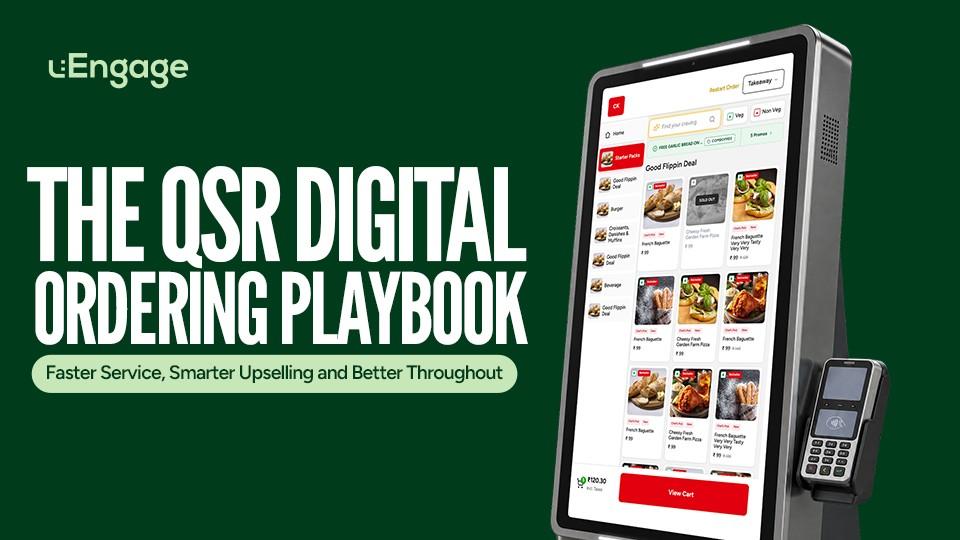
A self-ordering kiosk gives customers a dedicated place to browse, customise and pay independently.
The typical journey looks like this:
The customer starts the kiosk.
They browse menu categories and items.
They select variants, modifiers and add-ons.
They review available offers or combos.
They choose dine-in or takeaway.
They complete payment.
The order moves to the POS and kitchen workflow.
This removes the need for staff to manually capture every step.
Customer acceptance is also no longer a fringe behaviour. The National Restaurant Association reported that 61% of consumers were likely to use a self-service kiosk when available. Adoption was particularly strong among younger customers, who were also more open to other technology-led ordering options.
However, installing more screens does not automatically improve throughput. The kiosk experience must also be:
Quick to understand
Easy to navigate
Synced with the live menu
Connected to available inventory
Integrated with POS and kitchen systems
Compatible with familiar payment methods
Monitored across outlets
A confusing kiosk can create a new queue in front of the screen. A well-designed kiosk removes steps.
Smarter upselling without slowing the customer down
Upselling at a QSR works best when it feels helpful rather than forced.
A customer ordering a burger may genuinely need fries or a drink. Someone choosing a single item may benefit from seeing that a combo offers better value. A family order may need an additional side, dessert or beverage.
Digital ordering can present these options at the right points in the journey.
Before the item is added
The menu can highlight:
Bestsellers
Popular combinations
Limited-period items
Value meals
New launches
During customisation
The customer can see:
Size upgrades
Extra toppings
Add-ons
Alternative bases or flavours
Meal upgrades
Before payment
The cart can show:
Frequently paired items
Missing meal components
Eligible offers
Minimum-order benefits
Relevant loyalty rewards
The purpose is not to cover the screen with promotions. Too many choices can slow the order and reduce trust.
“A good upsell helps the customer complete the meal they already had in mind.”
This is where digital ordering for QSRs becomes more than an order-capture system. It creates a repeatable selling journey that does not depend entirely on counter staff remembering every offer.
What does “better throughput” actually mean?
Throughput is the number of orders or customers a restaurant can process within a defined period without affecting accuracy or service quality.
For QSR operators, it should not be reduced to one vanity number.
A useful throughput review should examine:
Metric | What it tells the operator |
|---|---|
Average ordering time | How long customers take to complete an order |
Queue length | Whether demand is exceeding counter capacity |
Orders per channel | How demand is distributed across counter, kiosk and online |
Orders processed per peak hour | Whether the outlet can handle rush-hour demand |
Order accuracy | Whether greater speed is creating more mistakes |
Payment success rate | Whether customers are failing at checkout |
Average order value | Whether the ordering journey supports better carts |
Add-on attachment rate | How often customers select suggested extras |
Order abandonment rate | Where customers leave before completing payment |
Kitchen preparation time | Whether the bottleneck has shifted from ordering to production |
The objective is balance. Faster ordering is useful only when the kitchen, payment system and collection process can handle the additional demand.
Kiosk ROI: what QSR operators should measure
The return on a self-ordering kiosk should not be evaluated only by comparing kiosk sales with hardware cost.
A practical ROI calculation should include four areas.
1. Incremental order capacity
Did the outlet process more orders during its busiest periods?
Measure:
Peak-hour orders before and after rollout
Counter queue length
Customer abandonment
Orders completed per operating hour
2. Cart improvement
Did customers build better carts?
Measure:
Average order value
Combo adoption
Add-on attachment rate
Upgrade selection
Offer redemption
3. Operational efficiency
Did the kiosk reduce repetitive order-taking work?
Measure:
Percentage of orders completed independently
Manual order-entry time
Counter staffing pressure
Order corrections
Refunds caused by incorrect entry
4. Customer adoption
Are customers actually choosing the kiosk?
Measure:
Kiosk order share
Payment completion rate
Repeat usage
Average kiosk session time
Exit point
Customer feedback
Digital ordering for QSRs creates value when it improves several of these metrics together. One metric rising while payment failures or kitchen delays also rise is not a complete win.
The role of websites and branded apps
Kiosks solve an in-store ordering problem. Websites and branded apps solve the direct ordering journey before the customer reaches the outlet—or when they prefer takeaway and delivery.
Deloitte’s restaurant research found that 40% of customers preferred placing delivery or takeaway orders directly through a restaurant’s website or app, compared with 13% who preferred a third-party website or app. While this study reflects surveyed markets rather than India alone, it demonstrates the wider customer preference for convenient direct channels.
A direct ordering website or branded app can help QSRs:
Accept pickup and delivery orders
Display outlet-specific menus
Make offers visible
Support repeat ordering
Build an owned customer database
Run loyalty programmes
Send relevant marketing communication
Reduce dependency on a single order source
The website, app and kiosk should not feel like separate businesses. Customers should find consistent menus, pricing, offers and branding across every channel.
One menu should power every ordering channel
Menu inconsistency is one of the easiest ways to break a digital ordering experience.
Imagine this customer journey:
A customer sees an offer on Instagram.
They open the restaurant website.
The offer is not visible.
They visit the outlet.
The kiosk shows a different menu.
A selected item is unavailable at payment.
Staff must manually correct the order.
The technology is present, but the experience is still fragmented.
A connected menu system should allow QSR teams to manage:
Items and categories
Prices
Outlet availability
Variants and modifiers
Combos
Add-ons
Taxes
Order types
Offers
Menu timing
This is a core requirement when building digital ordering for QSRs across multiple outlets.
How uEngage connects kiosk and direct ordering
uEngage brings self-ordering kiosks and direct digital channels into a connected ordering ecosystem.
uKiosk for in-store self-ordering
uKiosk allows customers to:
Browse a visual menu
Customise their orders
Discover offers, combos and add-ons
Choose supported order types
Complete payments independently
Send orders into the connected POS and kitchen workflow
Restaurant teams can monitor performance and manage key kiosk settings through the uEngage dashboard.
Ordering by uEngage for direct channels
uEngage Ordering supports branded direct ordering through restaurant websites and mobile apps. It helps QSR brands build an experience where customers can order through channels owned by the restaurant.
Together, the two solutions address different moments:
Customer moment | Suitable channel |
|---|---|
Ordering inside the outlet | uKiosk |
Ordering before reaching the outlet | Website or branded app |
Repeat direct ordering | Website or app |
Peak-hour counter overflow | uKiosk |
Pickup or delivery ordering | Direct ordering platform |
The goal is not to force every customer into the same channel. It is to make the right channel available at the right moment.
A verified uEngage customer testimonial captures this broader value clearly. Sanam Kapoor, Founder of La Pino’z, says uEngage helped the brand “scale digital ordering seamlessly.” The full customer statement is available on the uKiosk .
A practical rollout plan for QSR brands
Rolling out digital ordering for QSRs works best when it begins with one operational problem, not a list of features.
Step 1: Identify the current bottleneck
Determine whether the main problem is:
Long counter queues
Slow ordering
Missed upsells
Manual order errors
Weak direct ordering
Inconsistent menus
Payment friction
Limited visibility across outlets
Step 2: Establish a baseline
Record the current:
Order time
Peak-hour volume
Average order value
Queue length
Error rate
Abandonment rate
Channel mix
Without a baseline, the team cannot prove improvement.
Step 3: Start with a controlled pilot
Choose one or a small number of representative outlets. Avoid selecting only the easiest or best-performing location.
The pilot should include:
A normal trading period
Weekend traffic
Peak-hour demand
Multiple menu categories
Real payment conditions
Staff and customer feedback
Step 4: Design the menu for the screen
A counter menu cannot always be copied directly onto a kiosk or mobile screen.
Review:
Category order
Item names
Image quality
Modifier complexity
Combo visibility
Add-on relevance
Sold-out behaviour
Payment instructions
Step 5: Train outlet teams
Staff should understand:
How to guide first-time users
How kiosk orders enter the POS
How to handle payment failures
How to refresh menu information
How to respond when an item is unavailable
How collection and order-status communication work
Step 6: Review operational impact
Compare the pilot results with the baseline. Look for improvements and new bottlenecks.
For example, faster ordering may increase pressure on the kitchen. That is useful information, not a failed pilot. The next improvement may need to happen in preparation or collection.
Step 7: Scale with central control
Once the workflow is stable, the system should support consistent configuration across outlets while allowing location-specific menus and availability where required.
Common digital ordering mistakes QSRs should avoid
Adding technology without defining the problem
A kiosk cannot solve an unclear operational challenge.
Treating the interface like a digital poster
Large banners and too many offers can make ordering slower. The interface should lead customers towards completion.
Showing every possible upsell
More recommendations do not always mean more revenue. Suggestions must be relevant to the selected item and customer stage.
Ignoring POS and kitchen integration
If staff must manually enter digital orders again, speed and accuracy benefits quickly disappear.
Measuring only total sales
Sales can rise because of seasonality, offers, new outlets or marketing activity. Measure channel-specific and operational metrics.
Forgetting the collection experience
Ordering faster has limited value if customers become confused about where or when to collect their food.
Using the same rollout for every outlet
A mall food-court kiosk, drive-through outlet and neighbourhood takeaway location may have different requirements.
Final takeaway
The future of quick service is not simply “more screens.”
It is a connected system where customers can order through the channel that suits them, menus stay consistent, relevant add-ons appear naturally, payments work smoothly, and orders reach the kitchen without unnecessary manual steps.
That is the real opportunity behind digital ordering for QSRs: faster service for customers, better selling opportunities for the brand and stronger operational control for the team.
For QSR brands evaluating their next step, uEngage connects self-ordering through uKiosk with branded website and app ordering, helping the restaurant manage more of the customer journey through one ecosystem.
Ready to improve your QSR ordering experience? Explore uKiosk and direct ordering with uEngage.